
Disclosure: GEEKOM sent me this unit. I wasn’t paid, and nobody saw this post before it went up.
TL;DR: Great homelab/office box with excellent I/O, holds 45W sustained, ran Docker 41h at ~11W. Local AI runs at 8–9.5 tok/s on an 8B model.
The IT13 Max uses the Core Ultra 9 185H. That’s Meteor Lake (launched end of 2023). But it still packs a 16-core CPU, Arc graphics, an NPU and 24GB of fast LPDDR5-5600 into a 0.9L box, with dual 2.5GbE and dual USB4. So the question for this review is simple: in 2026, is this a good always-on box for home lab and office work, and how far can it go if you also try local AI on it?
I tested it exactly as it arrived. No RAM or SSD changes, stock BIOS settings.
Specs
| Component | Specification |
|---|---|
| Size | 0.9L (5.35″ × 5.20″ × 1.97″) |
| CPU | Core Ultra 9 185H, 16C/22T, 5.1GHz |
| Power limits | PL1 45W / PL2 70W |
| GPU | Intel Arc, 8 Xe-cores Up to 2.35 GHz |
| NPU | Intel AI Boost |
| RAM | 24GB LPDDR5-5600 (soldered in the review unit) Alternate 16 GB/1 TB configuration features two DDR5-5600 SO-DIMM slots and supports up to 96 GB |
| Storage | 1TB Kingston NV3, PCIe 4.0 |
| Front I/O | 4x USB-A 10Gbps, audio jack |
| Rear I/O | 2x USB4, 2x HDMI 2.0, 2x 2.5GbE, 2x USB-A |
| Sides | SD 4.0 (left), Kensington (right) |
| Other | RS232/RS485, VESA mount |
| Wireless | Intel BE200 Wi-Fi 7, Bluetooth 5.4 |
| Displays | 4x 4K or 1x 8K |
| OS | Windows 11 Pro 25H2 (stock) updated to 26H2 |
| BIOS | IT13.Max 0.28 (May 2026) |
| Adapter | 120W (19V / 6.32A) |
| Price | $819 using public site code IT13M130 at the time of writing |
| Warranty | 3 years |
Build Quality & I/O
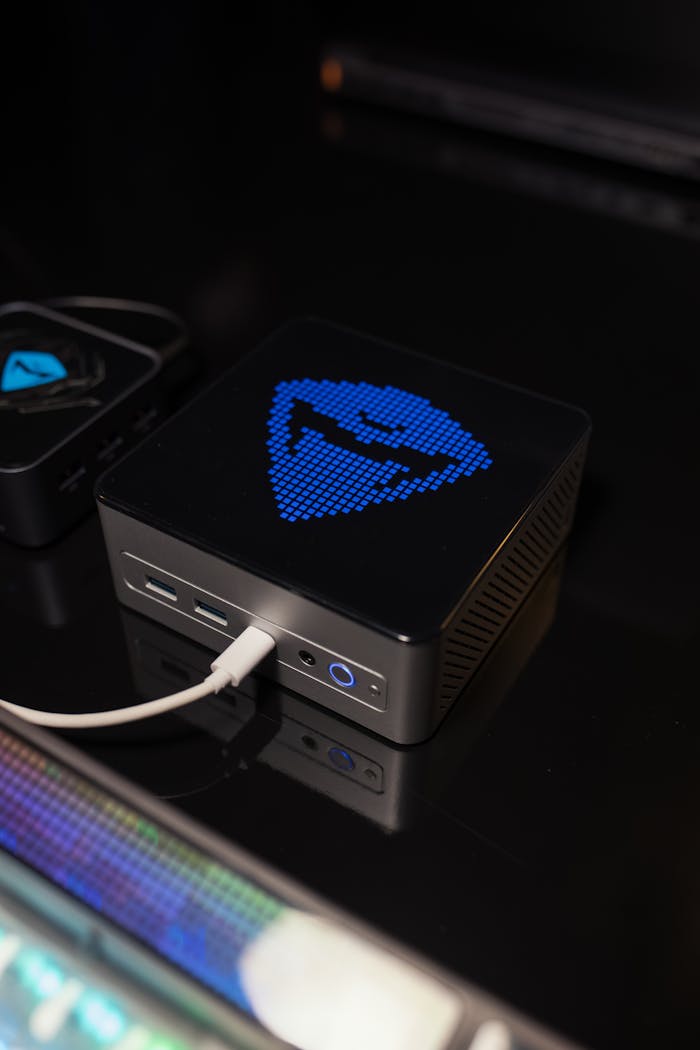
It’s a solid little box. The shell is black metal with soft, rounded corners, a shiny trim running around the top and a silver GEEKOM logo in the middle of the lid. Nothing flashy, and that’s fine by me. It barely takes up any desk space, and with the VESA mount in the box you can hide it behind your monitor. Both sides are mostly vent holes, and the big exhaust at the back pushes the hot air straight out.
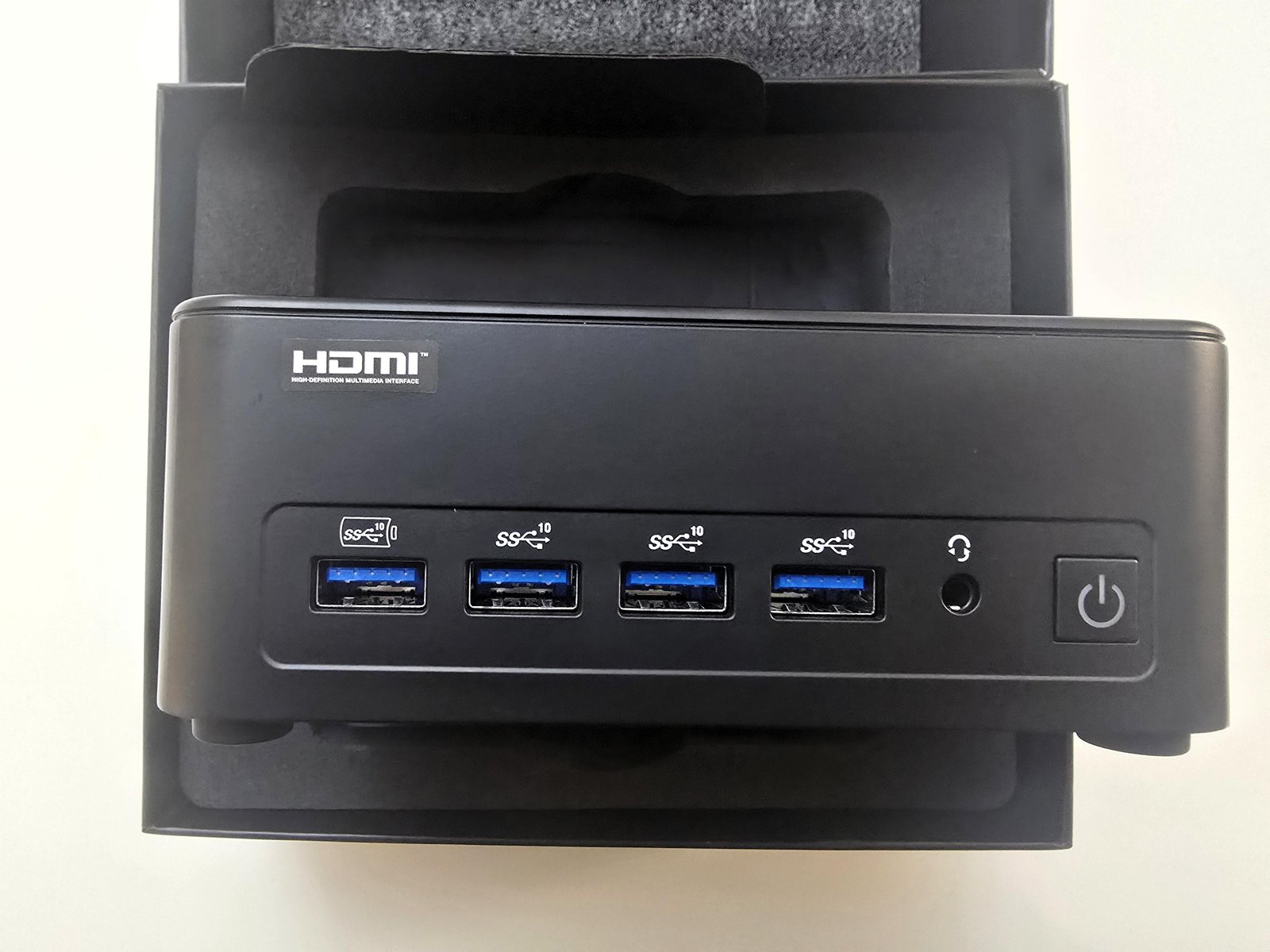
The front has four USB-A ports, all 10Gbps, plus a headset jack. There’s no USB-C on the front, so anything Type-C goes in the back.
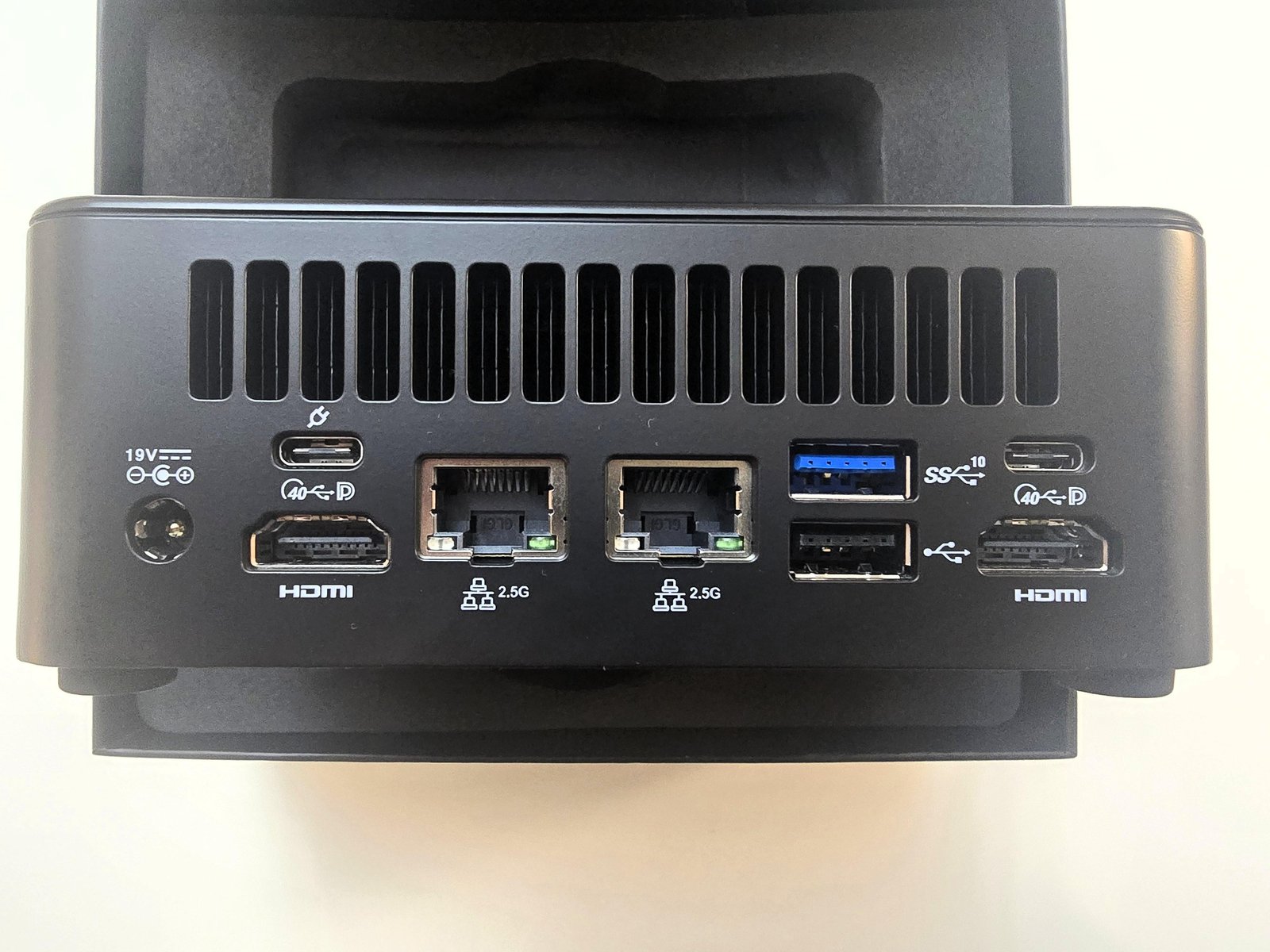
The rear is the highlight for me. Dual 2.5GbE lets you split traffic, e.g. one port for the LAN and one for a NAS or a separate VLAN. Two USB4 40Gbps ports, both with DisplayPort output, cover fast external storage, a dock or an eGPU later on. You also get another 10Gbps USB-A, and a USB 2.0 port that’s ideal for a keyboard/mouse dongle.
One thing I tested: the IT13 Max didn’t boot from my HP 65W USB-C charger, so plan on using the included adapter. I can’t say whether a higher-wattage USB-C PD charger would work.
Between front and back that’s 8 USB ports in total. Displays: two HDMI 2.0 plus the two USB4 ports give you up to four 4K screens, and if you want 8K it has to go over USB4.
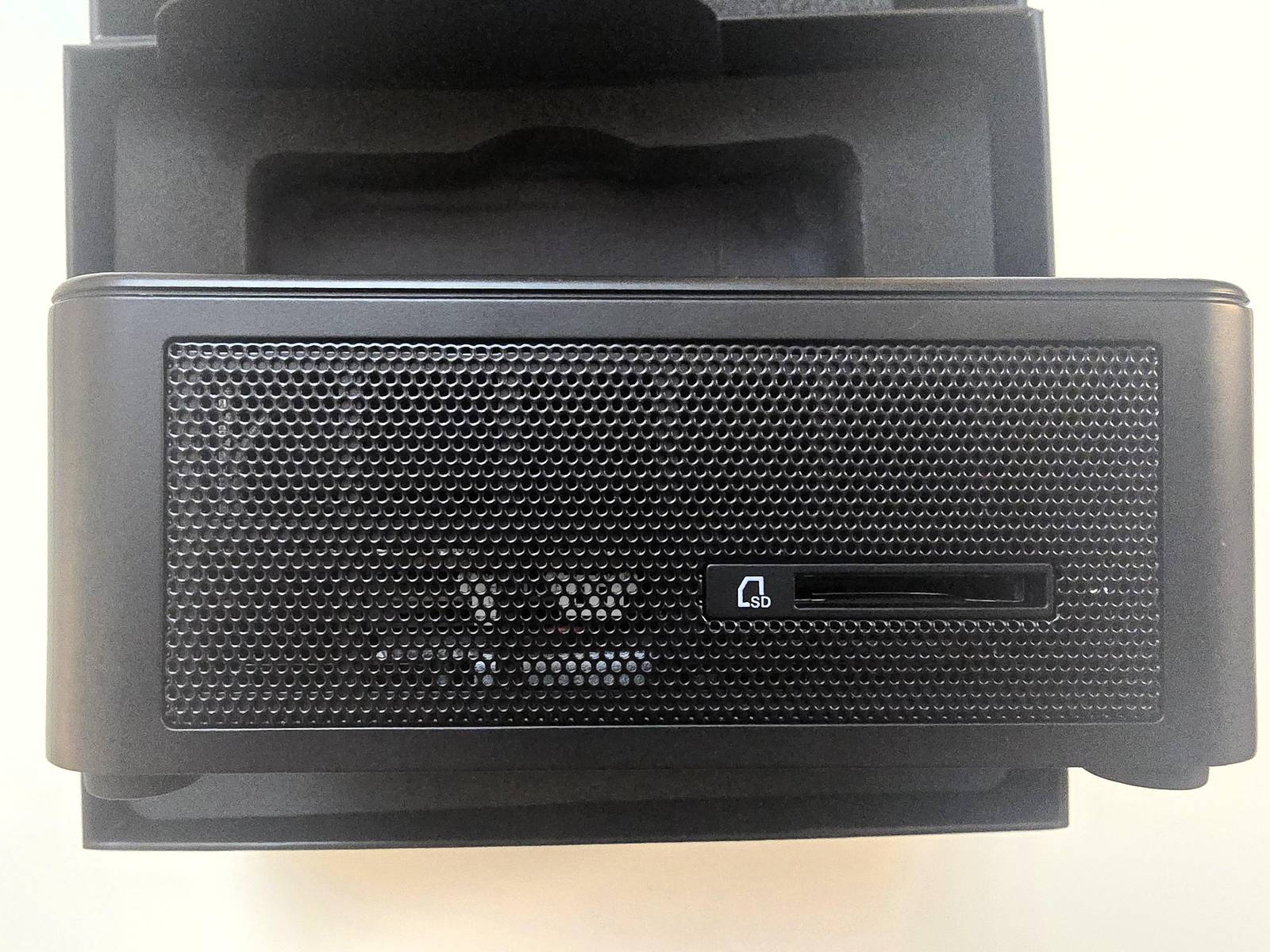
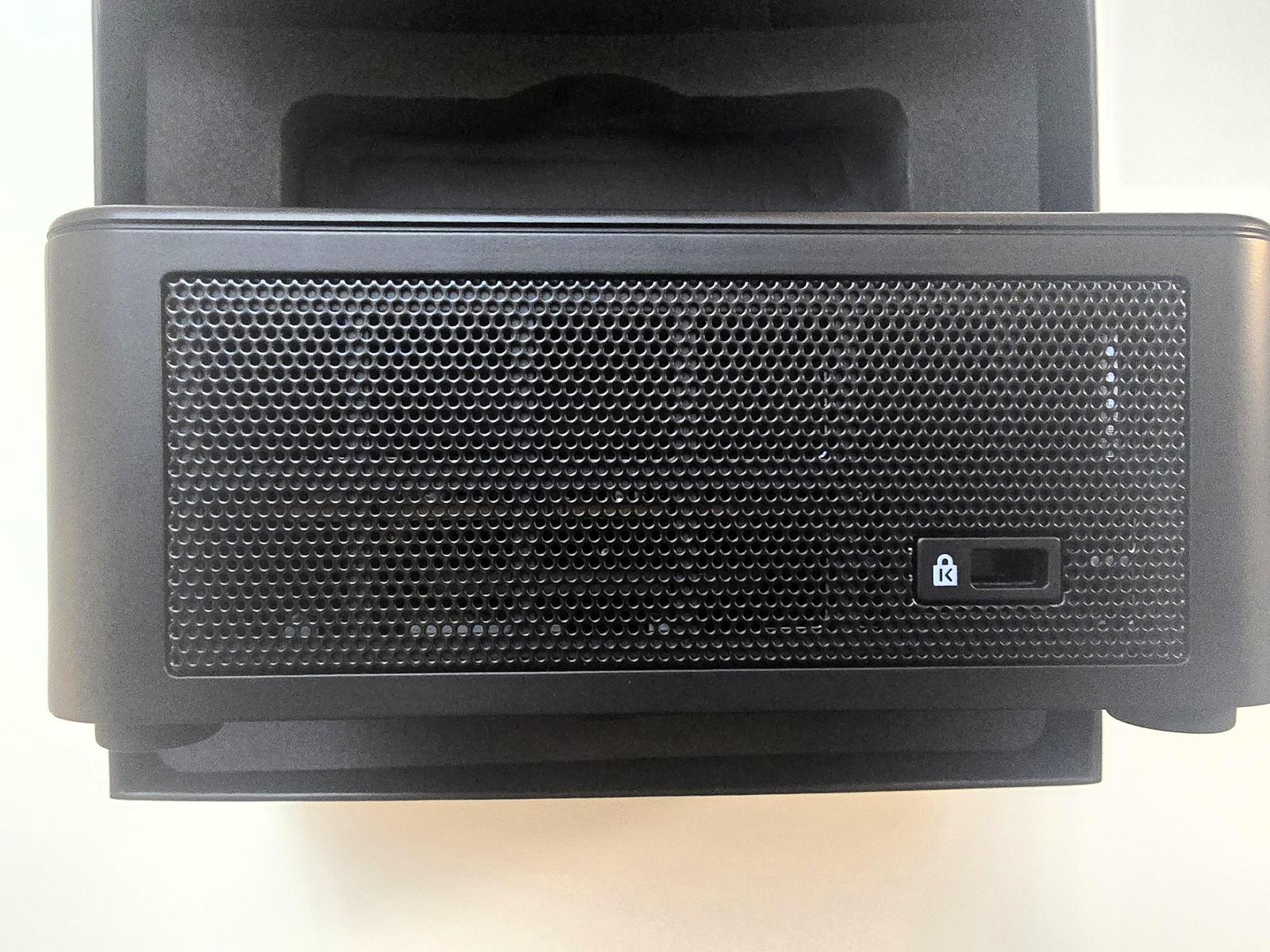
Both sides are mesh for airflow. The left side has the SD 4.0 reader, handy if you shoot photos or video, and the right side has a Kensington lock slot.
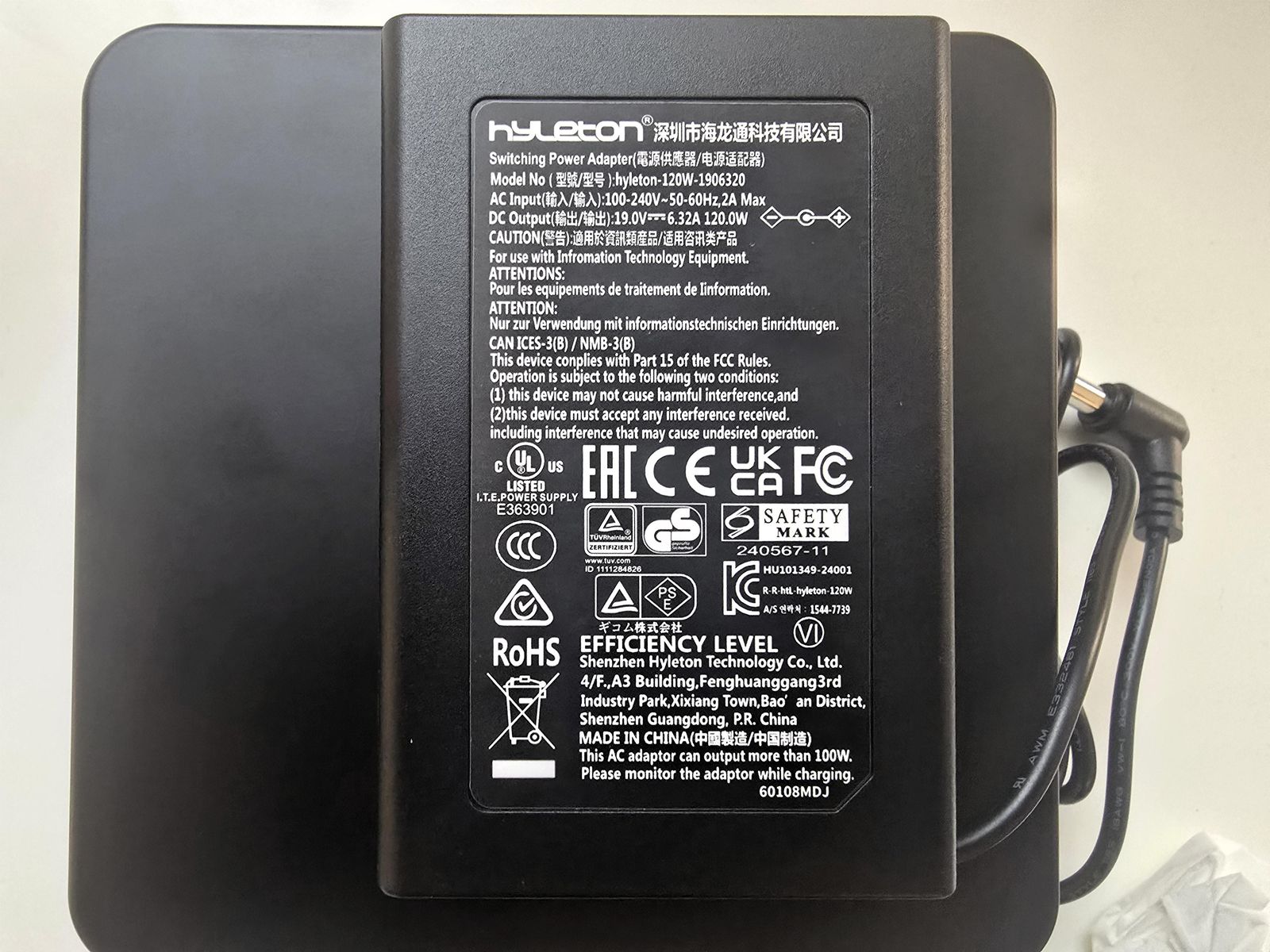
The included adapter is rated 120W (19V / 6.32A) with universal 100-240V input, so even the CPU’s 70W short-term limit (the highest I saw was 64W) leaves plenty of headroom for USB4 devices.
System Info
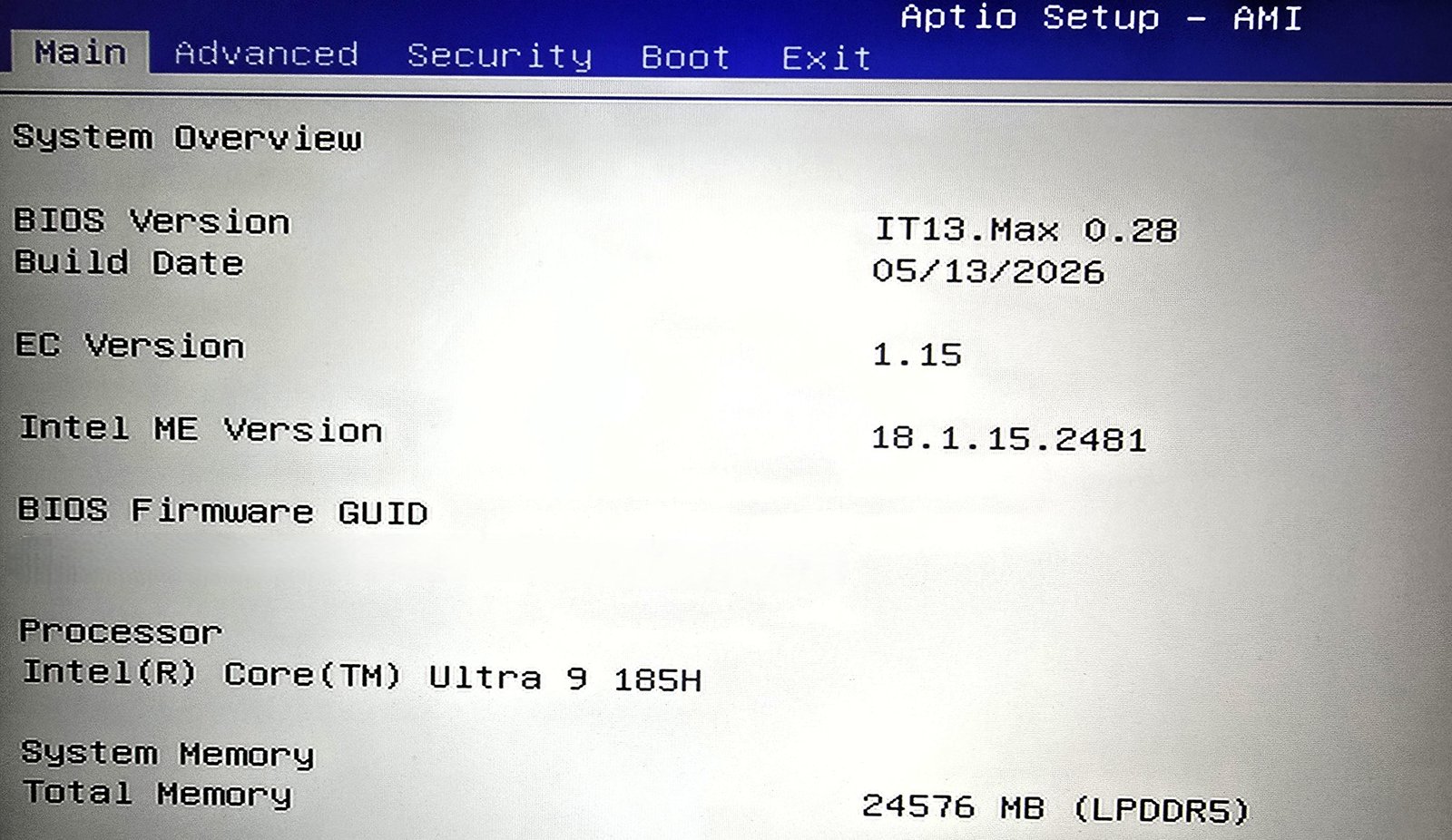
The BIOS (AMI Aptio) confirms the Core Ultra 9 185H and 24,576MB of LPDDR5, with BIOS version IT13.Max 0.28 dated May 2026. There are no user-facing performance or power-mode settings in the BIOS, so what you see is how it ships.
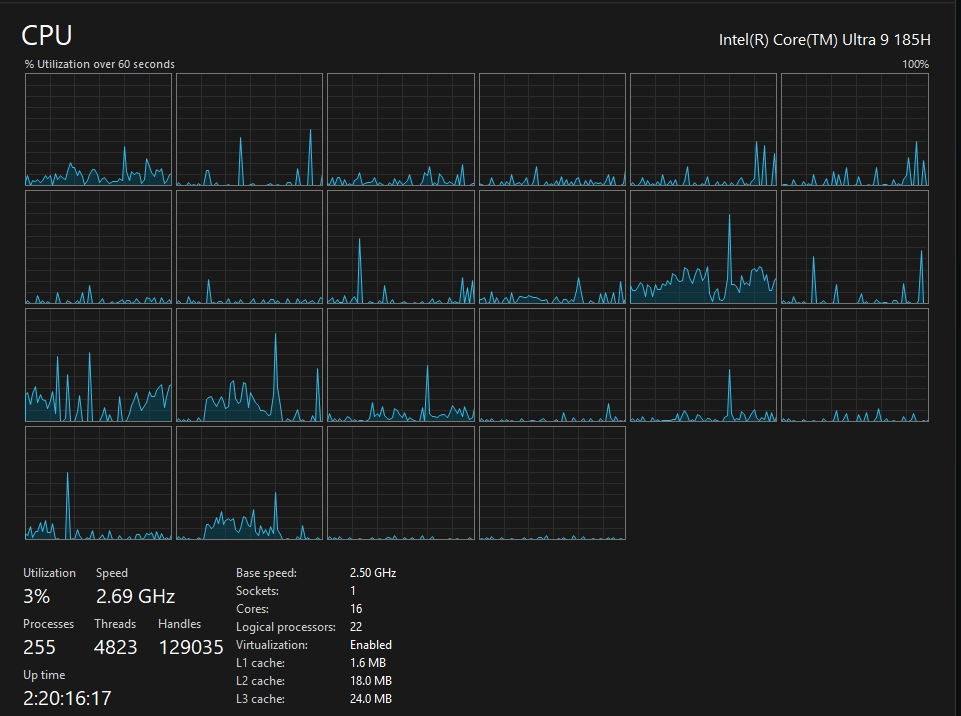
If you’re wondering why Windows shows 22 logical processors on a 16-core chip: only the 6 P-cores have Hyper-Threading (12 threads), and the 8 E-cores and 2 low-power E-cores run 1 thread each (10 threads). That adds up to 22.
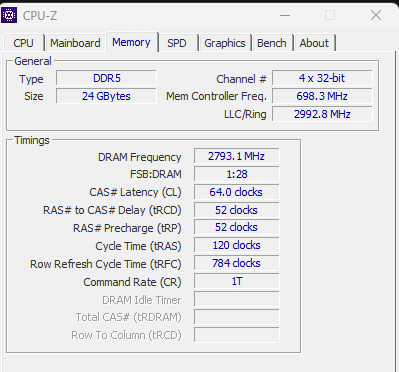
CPU-Z reports the memory as 24GB in 4 x 32-bit channels (128-bit total) with the DRAM clock at 2793 MHz, i.e. about 5,586 MT/s, matching the LPDDR5-5600 rating. (CPU-Z labels it “DDR5”; the BIOS screenshot above shows it as LPDDR5.)
This matters more than usual for AI work. LPDDR5-5600 on a 128-bit bus is about 89.6 GB/s theoretical, and memory bandwidth is the main thing that limits how fast an iGPU can generate tokens.
Storage
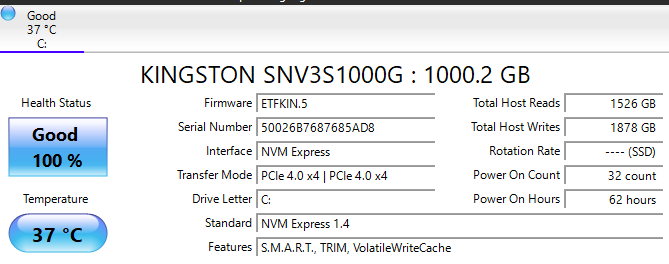
The 1TB drive is a Kingston NV3 (SNV3S1000G) running at PCIe 4.0 x4, health 100% (Good).
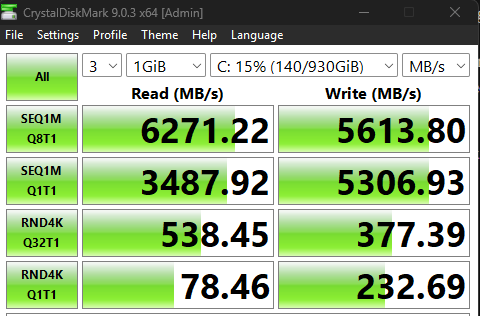
The IT13 Max supports up to 6TB of storage in total.
These runs use a 1GiB test file, so they show peak speed, not how the drive behaves during a long write.
Security Check: Malwarebytes Scan
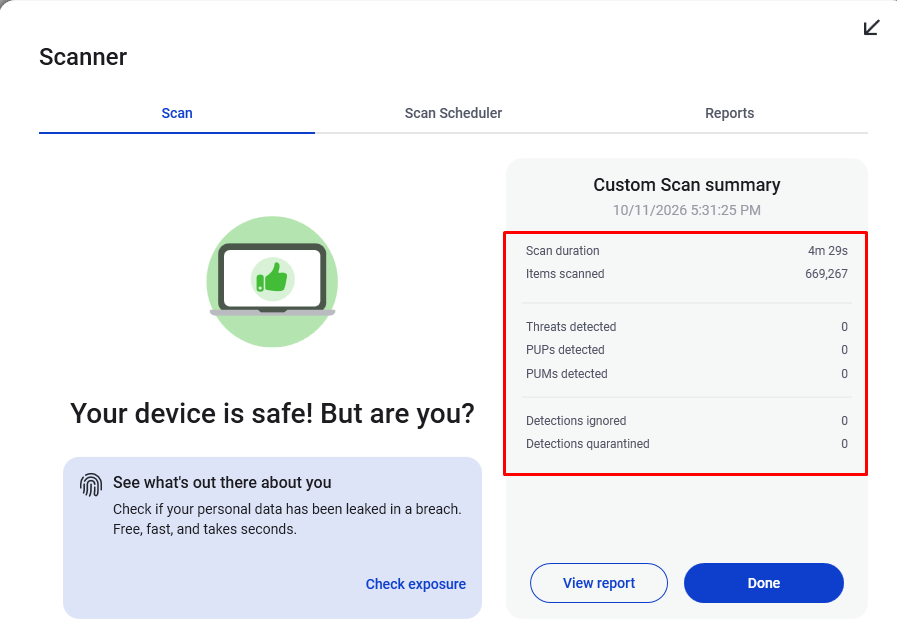
As with my previous reviews, I ran Malwarebytes on the pre-installed Windows 11 Pro before installing anything else. It scanned 669,267 items in 4m 29s: 0 threats, 0 PUPs, 0 PUMs. No bloatware either, just a clean Windows install.
I have updated the stock windows 25H2 to 26H2 with all the possible drivers updates from Microsoft and Intel.
Performance
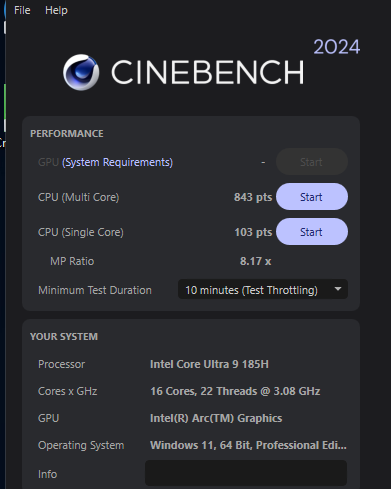
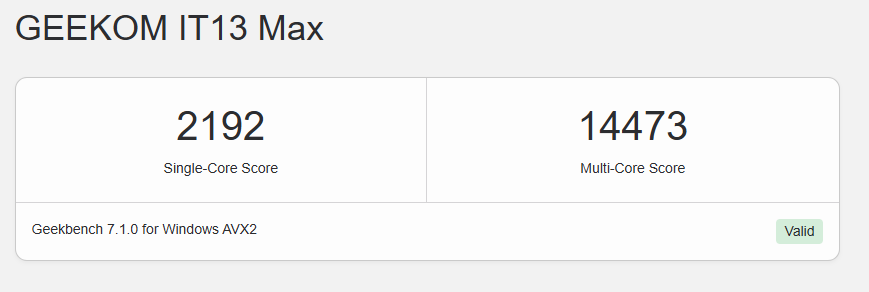
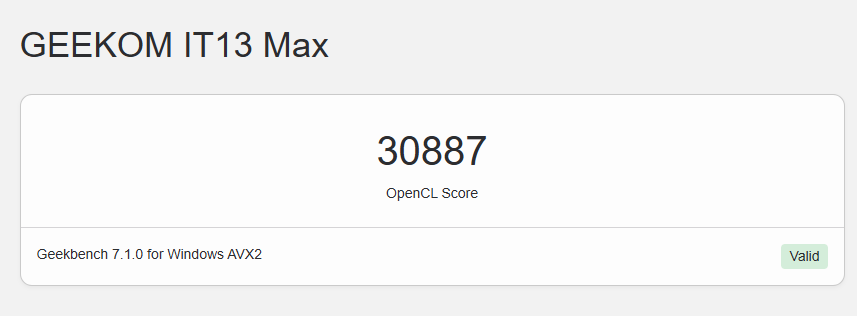
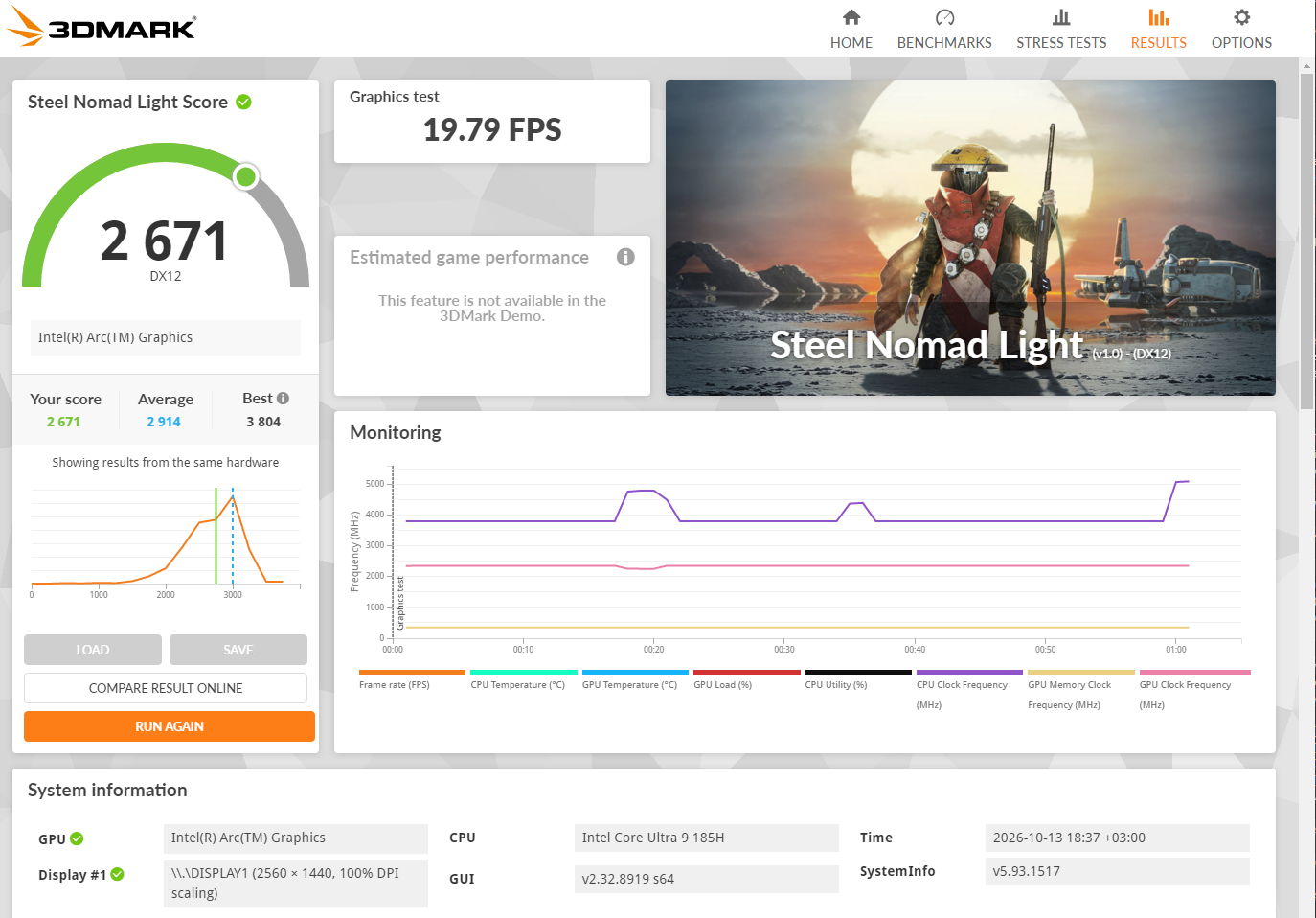
Geekbench 7 scores aren’t comparable with Geekbench 6 scores. 3DMark’s own comparison for the same hardware shows an average of 2,914, so this run sits a little under it.
| Benchmark | Score |
|---|---|
| Geekbench 7 single | 2,192 |
| Geekbench 7 multi | 14,473 |
| Geekbench 7 OpenCL | 30,887 |
| Cinebench 2024 single | 103 |
| Cinebench 2024 multi | 843 |
| 3DMark Steel Nomad Light | 2,671 |
All Geekbench runs are version 7.1.0. Cinebench multi/single ratio is 8.17, and the 3DMark graphics test averaged 19.79 FPS.
Day to day, the system feels very responsive for office work.
Thermals, Power & Noise
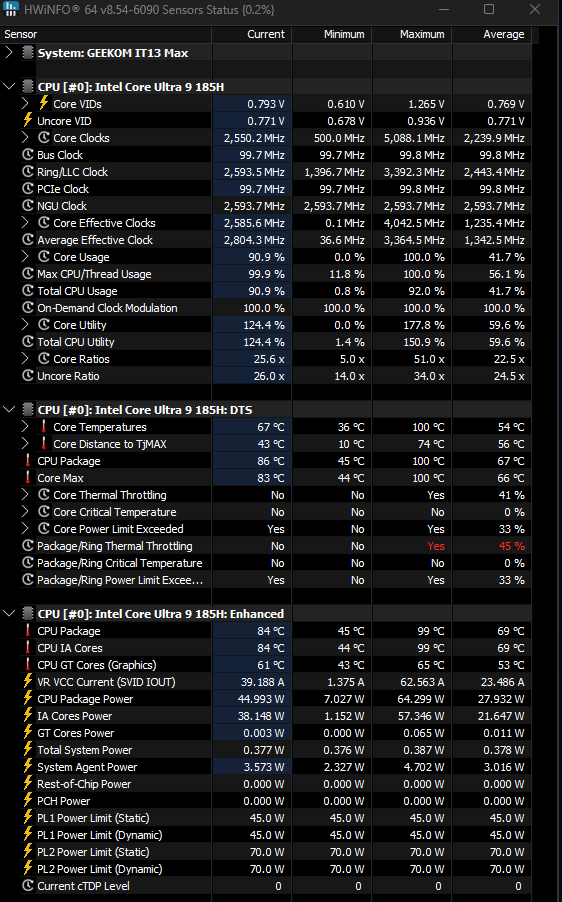
| Metric | Idle | Load |
|---|---|---|
| Package power, avg | 7W | 45W |
| Package power, peak | 12W | 64W |
| CPU temp, avg | 45°C | 83°C |
| CPU temp, peak | 64°C | 100°C |
It holds its limit. HWiNFO shows PL1 45W and PL2 70W at stock, while GEEKOM rates it for up to 65W. The CPU boosted to as much as 64W for about the first two minutes of the Cinebench multi-core run, then settled at about 45W for the rest of the run, with the CPU package around 83°C.
All power numbers are CPU package power from HWiNFO, even under load the fan stayed within what I’d consider acceptable for a 0.9L chassis.
Always-On Test: Docker Homelab Stack
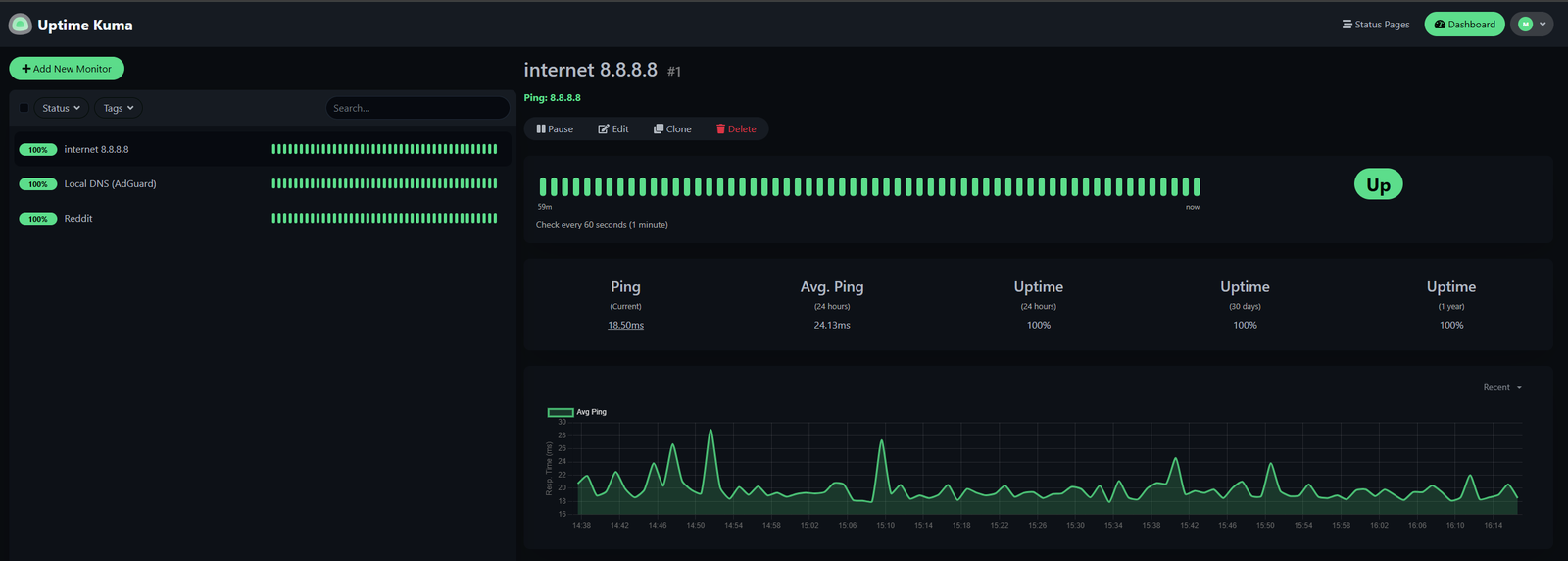
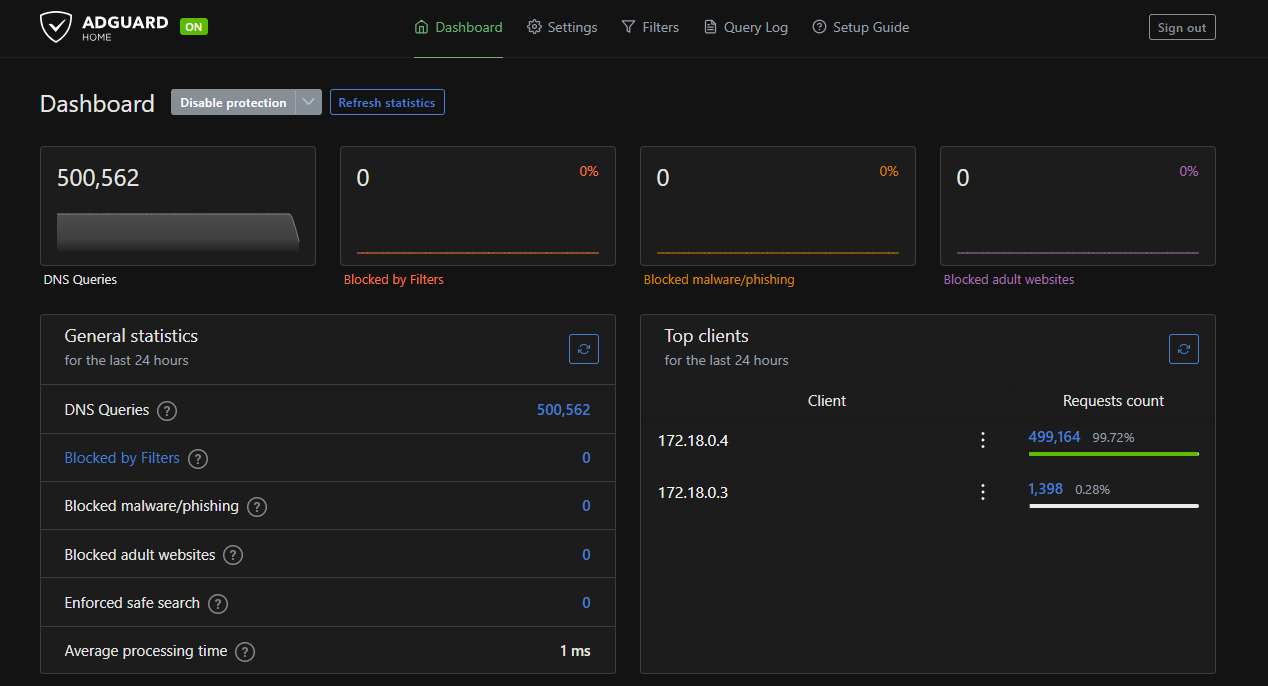
I left the IT13 Max running a small Docker Desktop (WSL2) stack for 41 hours 40 minutes: Uptime Kuma, AdGuard Home and a container sending steady DNS lookups through AdGuard.

| Metric | Result |
|---|---|
| Containers | All up 42h |
| Uptime Kuma | 100% (3 monitors) |
| AdGuard queries | 500,562 / 24h |
| AdGuard latency | 1 ms avg |
| Package power | 10.7W avg |
| CPU temp | 48°C avg |
| RAM used | 13.7GB avg, 15.7GB peak |
| SSD temp | 34-42°C |
| Unexpected restarts | None |
The stack never stopped, and the average package power stayed around 11W with it running. Note the RAM figure: with Docker and WSL2 running, more than half of the 24GB was in use (Windows included), and the memory is fixed on this config.
The Local AI Test: CPU vs Arc iGPU vs NPU
I also wanted to see how far this chip goes with local AI. My setup: llama.cpp’s llama-bench (build b11588, commit 7f51953d7), using the Vulkan build for the Arc iGPU and the CPU build for the CPU, and OpenVINO GenAI for the NPU. Each llama-bench result is the average of 5 runs.
One thing to know first: on Windows, the Arc iGPU borrows system RAM. Task Manager shows 13.4GB of shared GPU memory available on this 24GB machine. That’s the real limit on which models fit on the GPU. The 14B model (8.38GiB file) loaded and ran fully on the iGPU, with HWiNFO showing about 10.2GB of GPU memory in use during the run.

| Model | Backend | pp512 (tok/s) | tg128 (tok/s) | Power avg | Power peak |
|---|---|---|---|---|---|
| Qwen3-8B | CPU | 63.1 | 9.5 | 48W | 65W |
| Qwen3-8B | iGPU | 229.2 | 8.0 | 28W | 38W |
| Qwen3-14B | iGPU | 126.3 | 5.2 | 29W | 39W |
| Qwen3-8B | NPU | n/a | 8.55 | 17W | 23W |
pp512 is prompt processing and tg128 is generation.
The CPU and iGPU rows use Q4_K_M models in llama.cpp (CPU with 16 threads, iGPU via Vulkan with all layers offloaded).
Power is the HWiNFO package power across each whole run (prompt processing and generation together).
The NPU row is a different tool and model format (OpenVINO GenAI, INT4 Qwen3-8B, median of 3 runs, 400 tokens each), so treat it as a rough comparison, not a like-for-like benchmark. pp512 is n/a for the NPU, because OpenVINO reports time to first token instead (4.87 s), which is not comparable to the llama-bench prompt processing numbers.
The NPU averaged about 95% utilization at 1400 MHz during the run, and the 23W peak was at the start of the run.
With the same 8B model, the Arc iGPU processed prompts about 3.6x faster than the CPU (229 vs 63 tok/s) while drawing a little over half the package power (28W vs 48W). Generation is a different story: the CPU was slightly faster (9.5 vs 8.0 tok/s). The 14B model ran fully on the iGPU at 5.2 tok/s generation and 126 tok/s prompt processing.
The NPU generated at 8.55 tok/s, close to the iGPU’s 8.0 and just under the CPU’s 9.5. Its package power averaged about 17W, against 28W on the iGPU and 48W on the CPU, with the CPU almost idle (around 5% usage).
So the NPU gives similar generation speed at roughly a third of the CPU’s power.
The catch is the 4.87 s wait before the first token. Also keep in mind that the NPU only helps when your software supports it. I had to use OpenVINO for this test, because llama.cpp (which I used for everything else) doesn’t run on it.
In short: use the Arc iGPU when prompts are long (documents, RAG, coding context), because it chews through them 3.6x faster than the CPU. For short prompts, the three backends generate at similar speeds, and the NPU does it at the lowest power. 14B models fit and run on the iGPU, but at 5.2 tok/s generation they’re slower than the 8B models.
Who is it for?
If you want a small, always-on box for containers, a homelab or a multi-monitor office desk, this fits well. If local AI is your main reason to buy, look elsewhere: 8-9.5 tok/s on an 8B model is fine for trying things out, not for daily use. The I/O is the real selling point: dual 2.5GbE, dual USB4, four display outputs and six USB-A ports mean you won’t need a dock. It’s not the pick if you want the fastest single-thread performance or the newest iGPU.
The bigger choice is the configuration. This 24GB LPDDR5 model gives the iGPU more memory bandwidth, which helps token generation, but you’re stuck at 24GB for good. With my Docker stack running, RAM use already averaged about 14GB (15.7GB peak). If you plan to run VMs or bigger models, or you’ll keep it for years, the 16GB SO-DIMM model (up to 96GB) is the safer long-term buy. If you know 24GB is enough, this one gives you the faster memory out of the box.
Pros
- 8 USB ports incl. dual USB4, plus dual 2.5GbE and Wi-Fi 7, in 0.9L
- Sturdy metal chassis that needs very little desk space, with an included mount
- Fast 24GB LPDDR5-5600; a 14B model fits and runs fully on the Arc iGPU
- Held 45W sustained in Cinebench, with fan noise acceptable for a 0.9L box
- 120W adapter with plenty of headroom
- Clean Windows install, no bloatware
- 3-year warranty
- Ran a Docker homelab stack for 41+ hours with 100% uptime at about 11W average package power
Cons
- 24GB is fixed on this config; get the SO-DIMM version if you want more RAM.
- No USB-C on the front.
- Not a local AI machine: 8-9.5 tok/s on an 8B model, 5.2 tok/s on 14B.
- Didn’t boot from a 65W USB-C charger (HP), so you need the included adapter.
Verdict: A 185H in 0.9L gets you a sturdy, quiet-enough box that holds 45W under sustained load, runs an always-on Docker stack at about 11W, and feels very responsive for office work. It’s a perfect always-on Docker containers machine.
It’s not a local AI box, though. It runs 8B models, but at 8-9.5 tok/s it’s better for experimenting than for daily use. If you do try it, the Arc iGPU is the pick for long prompts, and the NPU uses the least power.
Meteor Lake isn’t the newest chip, but it wins on connectivity and balanced, steady performance.
Let me know your thoughts in the comments. If you’re running local models on a Core Ultra 9 / Meteor Lake box, I’d love to compare numbers, and I’ll try to answer any questions!